
The Work
Find the right data and reduce the noise
I worked directly with the airline’s data engineer to arrange database access for a dashboard serving the airline and Viasat. The airline already had a maintenance-deferral dashboard, and the engineer copied its SQL-backed information link into our reporting repository. I reduced the SQL selection to the fields needed for WiFi maintenance and filtered the relevant maintenance groups before matching the results to our supported fleet.
The second source was our supported-fleet list from Salesforce. That list had to define eligibility: an aircraft appearing in the airline’s deferral report did not automatically mean Viasat was responsible for the work. I used the fleet list as the master and matched maintenance records to it.
A missing zero could become a missed aircraft
The identifier comparison was a concrete data-quality problem. Some Salesforce exports omitted the leading zero from a four-digit aircraft nose identifier, and Spotfire read different source columns as strings or integers. I standardized the identifiers and their types before building the match.
The first join retained the supported aircraft even where no open deferral matched. That was useful during preparation, but those blank maintenance rows did not belong in the action list. I filtered out rows without a logpage so the final view focused on aircraft with an actual open record.
Open work was only half the answer
The maintenance report’s flight fields described the station scheduled against a particular discrepancy. They were not a dependable picture of where the aircraft would be next. After searching for another source, I found a flight-information link and worked with the data engineer to add it.
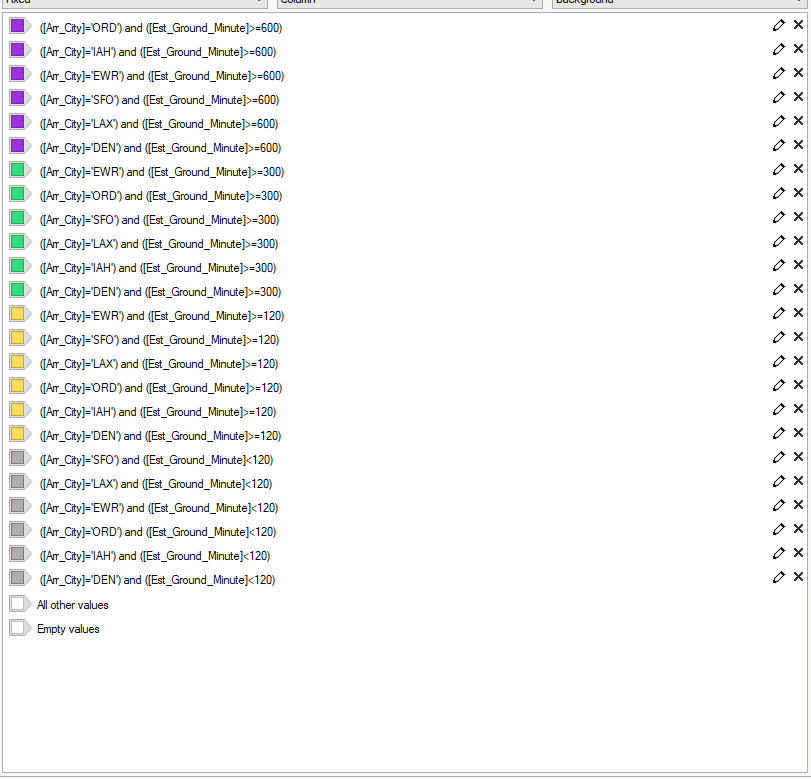
I joined the routing information to the supported aircraft with open work and built linked views. Selecting an aircraft filtered its flights, and another view showed arrivals at our maintenance stations. Ground-time colors distinguished windows of at least ten, five, and two hours from shorter visits.
Those colors supported scanning; they did not automatically decide whether a job could be completed. The user still needed to consider the discrepancy and available technician. I also retained a broader routing view so the supported-station filter did not remove the context of the aircraft’s other flights.
Put the information where the team would read it
The live dashboard updated every three minutes, but reaching Spotfire required navigating the airline network and login process. I built a reporting view limited to the next two days and scheduled a server-side task to send updated dashboard images every two hours.
The email gave coordination staff a recurring reference for checking whether work orders and dispatches were addressed. I documented the SQL selections, identifiers, joins, filters, color rules, and schedule so the workflow could be followed beyond the finished screen.
The supported-fleet list still required a manual Salesforce export. The workflow automated the maintenance views and their delivery while keeping that source update as a separate step.
| Input or view | Decision it supports | Important dependency |
|---|---|---|
| Salesforce supported-fleet list | Is this aircraft eligible for our maintenance support? | Manual export; aircraft identifiers and types must match |
| SQL-backed deferrals | Does the supported aircraft have open WiFi work? | A matching logpage is required for the action list |
| Linked flight routing and station views | Where might a technician reach the aircraft? | Ground-time colors guide review; job scope and staffing still matter |
| Two-day email snapshot | Which upcoming opportunities need follow-up? | Images are sent every two hours; the live dashboard refreshes every three minutes |
At a glance
From aircraft records to a planning view
- Define the supported fleet
A manual Salesforce export identifies aircraft eligible for Viasat maintenance.
- Match open WiFi work
Normalized aircraft identifiers connect the fleet to SQL-backed deferrals with a matching logpage.
- Add flight routing
Linked station and ground-time views show where a technician might reach the aircraft.
- Share the view
The live dashboard refreshes every three minutes; two-day image snapshots arrive by email every two hours.
The fleet export remained manual. Staff still reviewed the job scope and available technician before dispatch.
THE DELIVERABLES
What I delivered
- Spotfire dashboard joining supported aircraft, open maintenance deferrals, and flight information.
- Linked aircraft-routing views with station filtering and ground-time indicators.
- Two-day reporting snapshot delivered through a scheduled two-hour email task.
- Documentation covering source fields, identifier formatting, transformations, and reporting setup.
A CLOSER LOOK
Project exhibits
Put maintenance needs beside the flight schedule
The two-day planning view brings active deferrals, upcoming station arrivals, available ground time and station totals together.

Make the available time easy to scan
The color rules distinguish station visits by available ground time, making shorter and longer maintenance windows easier to scan.
THE OUTCOME
Where the work stands
Built a working reporting workflow that surfaces maintenance opportunities from multiple operational sources in one view and distributes recurring snapshots.
SCOPE AND LIMITATIONS
What the work establishes
The supported-fleet export remained manual.
The dashboard was designed around approximately 190 supported aircraft, with planned growth to 600 informing the workflow.